Mac developer cleaner
Mac developer cleaner for Docker, Xcode and node_modules
Development tools quietly fill a Mac with build artifacts. MacZentra finds Docker.raw, Xcode DerivedData and simulator caches, every large node_modules folder and your package-manager caches, shows the real on-disk size of each, and lets you preview what will be deleted before anything runs.
$49.99 once, no subscription. Use code ZENTRA20 at checkout for 20% off.
7-day money-back guarantee- 7-day premium trial, no card needed
- Your files never leave your Mac
- Removals go to the Trash
- Notarized by Apple
- 15.4 MB app
- macOS 13 Ventura or later · Apple silicon
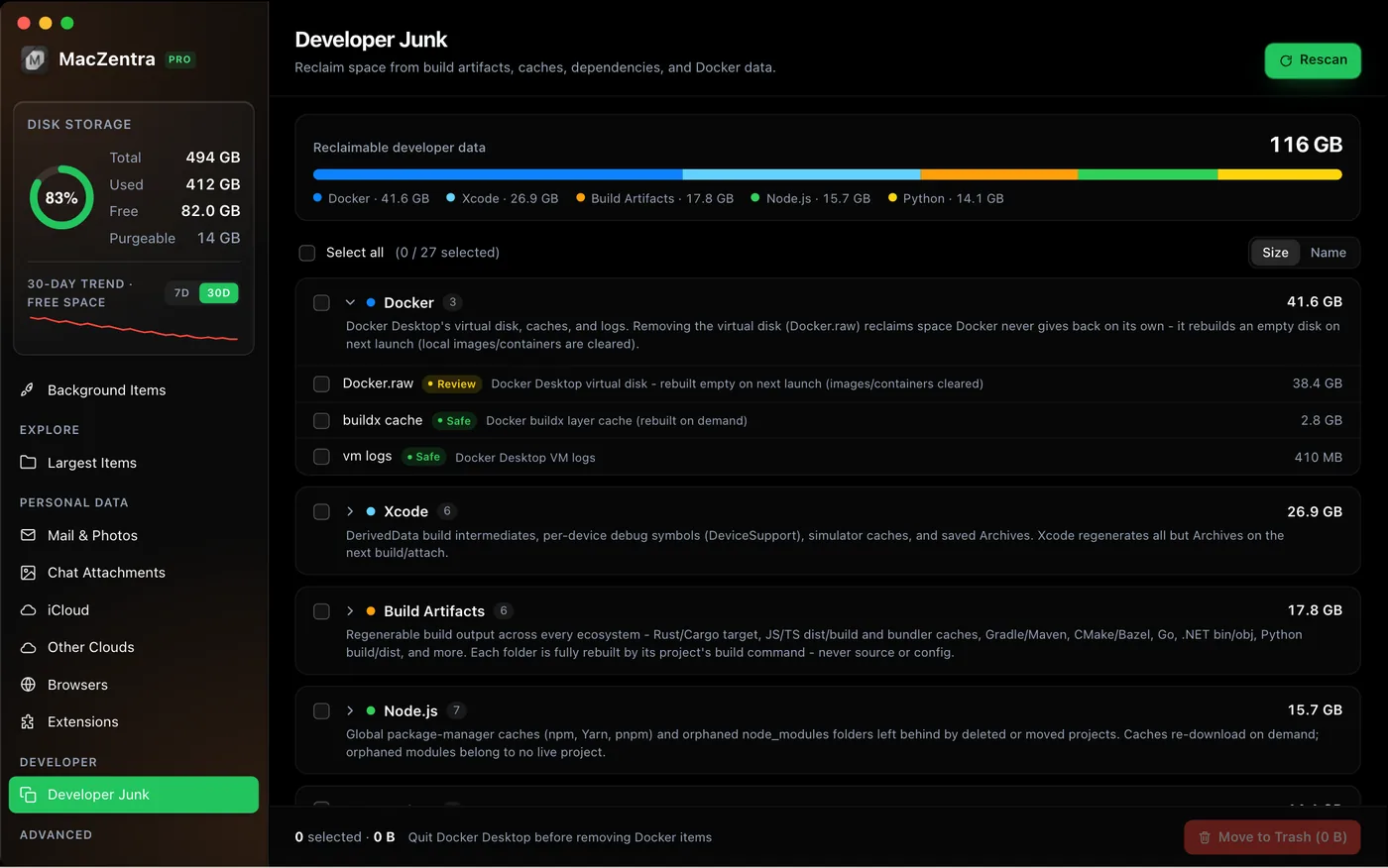
What it finds
Docker
Docker.raw and Docker caches. A sparse Docker.raw reports what you would truly reclaim, not its nominal size.
Xcode
DerivedData, iOS DeviceSupport, Archives and simulator caches.
Node.js
Every large node_modules folder (50 MB or more) plus npm, Yarn, pnpm and Bun caches.
Python and Conda
Conda environments and pip caches.
Developer Mode
A Git-style unified diff of what will be deleted and what stays, exportable as a .patch file. Nothing is removed until you click Execute. Included in the full version.
msc command line
Run the same scans from Terminal, for example msc dev-junk --dry-run to list developer junk without deleting it. Included in the full version.
Protected Folders
An ignore-list that keeps active projects out of every scan and cleanup. Included in the full version.
$49.99 once · code ZENTRA20 for 20% off at checkout · 7-day money-back guarantee
How it works
1. Scan
Run a scan and open Developer Junk. Each item shows its real on-disk size.
2. Preview
Risky items are never pre-selected. With Developer Mode on, a diff shows exactly what will go before you confirm.
3. Clean
Removed items go to the macOS Trash. Protect the folders you are working in so they are always skipped.
Where developer disk space goes
Docker
Docker.raw is a sparse disk image. It grows when images and containers need room but does not shrink when you delete them, and its nominal size can be far larger than what it really occupies. MacZentra reports the real on-disk size.
Xcode
DerivedData holds build products and indexes and is regenerated on your next build. iOS DeviceSupport, Archives and simulator caches add up across Xcode and iOS versions.
Node.js
Every project keeps its own node_modules, so a few dozen old projects can hold many gigabytes. The npm, Yarn, pnpm and Bun caches sit on top of that.
Python and Conda
Conda environments and pip caches grow with every project and experiment.
A safe order for cleaning a development Mac
1. Protect what you are working on
Add active projects to Protected Folders so they are skipped by every scan and cleanup.
2. Dry run first
Run msc dev-junk --dry-run in Terminal to list developer junk without deleting anything.
3. Read the diff
With Developer Mode on, a Git-style diff shows what will be deleted and what stays. Nothing is removed until you click Execute.
4. Clean up
Removed items go to the macOS Trash, so a stale folder you needed after all can be restored.
Frequently asked questions
Is it safe to delete Xcode DerivedData?+
Yes. DerivedData is regenerated the next time you build, so deleting it only costs you a slower first build.
How do I free up space used by Docker on a Mac?+
Docker.raw is a sparse disk image that grows and does not shrink on its own. Prune unused images, volumes and build cache first. MacZentra shows the real on-disk size so you know what a cleanup would reclaim.
Can I find all node_modules folders at once?+
Yes. MacZentra lists every node_modules folder of 50 MB or more by size, so you can delete the stale ones and keep the ones you use.
Can I preview what will be deleted?+
Yes. Developer Mode shows a Git-style diff of the removal and can export it as a .patch file. The msc command line prints the same preview with --dry-run.
Does it need a subscription?+
No. It is a one-time $49.99 purchase for one Mac.
Will deleting node_modules break my project?+
No. node_modules is recreated from your lockfile the next time you run npm install, yarn, pnpm install or bun install. Leave alone any project you could not reinstall offline.
Is it safe to delete Docker.raw?+
Deleting it removes the images, containers and volumes stored inside it. Prune what you do not need first and back up any volume holding data you care about. The Docker.raw guide walks through the options.
Scan your Mac for free. Pay only to clean.
Everything you remove goes to the macOS Trash, so you can restore it.
$49.99 once, no subscription. Use code ZENTRA20 at checkout for 20% off.
7-day money-back guarantee- 7-day premium trial, no card needed
- Your files never leave your Mac
- Removals go to the Trash
- Notarized by Apple
- 15.4 MB app
- macOS 13 Ventura or later · Apple silicon
Step-by-step guides: Xcode DerivedData: what's safe to delete, shrink Docker.raw, delete every node_modules folder, clear Homebrew, pip and Gradle caches, or CLI commands reference.
macOS 13 Ventura or later · Apple silicon. MacZentra is an independent app and is not affiliated with METER Group’s ZENTRA.