
Check storage
MacZentra CLI: Command Reference and Use Cases
The MacZentra team · Updated Oct 1, 2026 · 6 min read
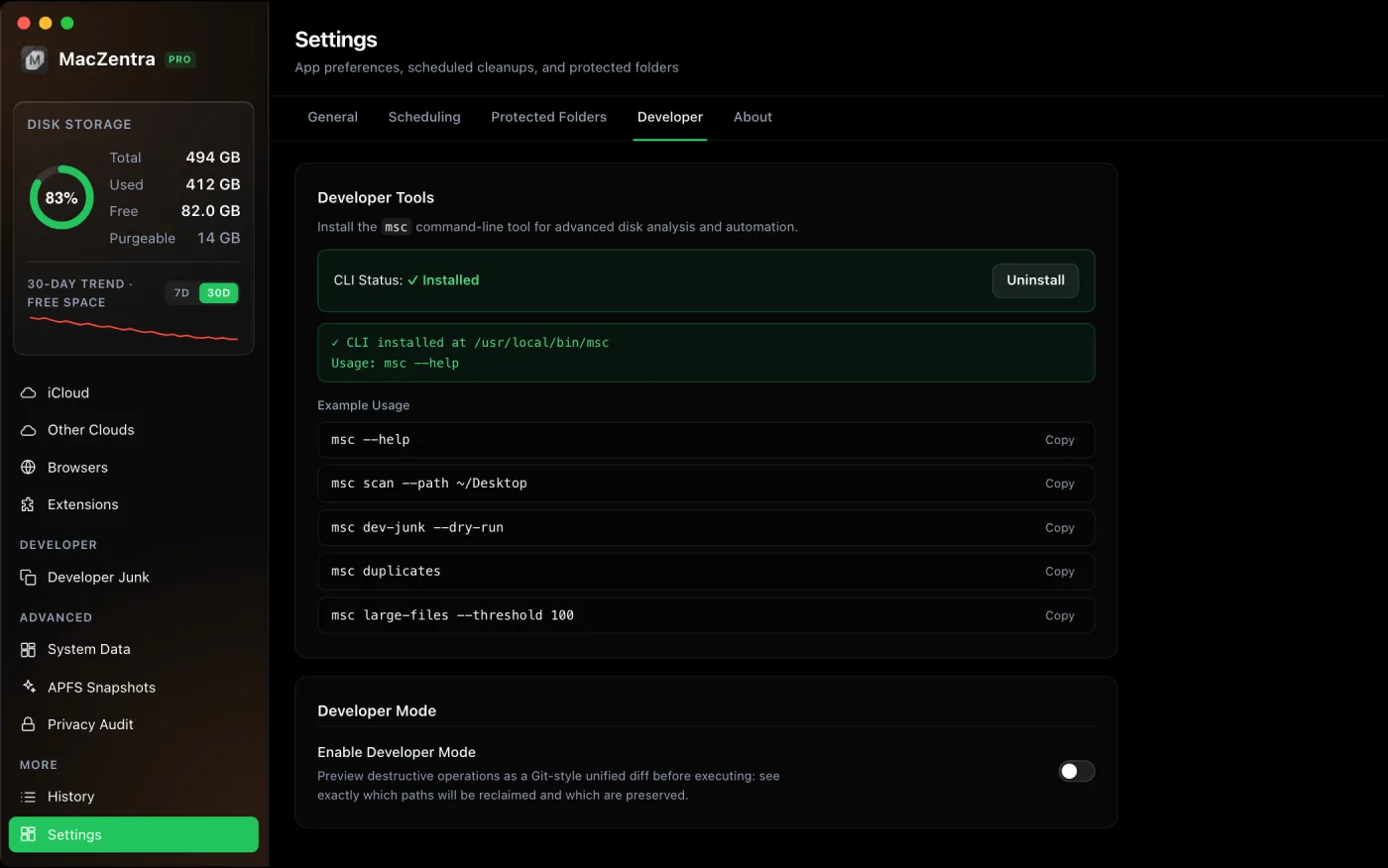
The msc command is MacZentra's headless companion for the terminal. It reuses the exact same backend as the desktop app, the same scanner, duplicate finder, developer-junk and large-file engines, so its results match the GUI with no drift. It's a Pro feature: every run checks your license first, and every deletion goes to the Trash so it stays recoverable.
Installing the command
Install msc from the app's Settings panel. It symlinks the bundled binary to /usr/local/bin/msc, or falls back to ~/.local/bin/msc if /usr/local/bin isn't writable. If the app is running from a translocated (quarantined) path, typically straight out of ~/Downloads, the symlink would break on restart, so move MacZentra.app to /Applications first.
Command reference
| Command | What it does |
|---|---|
msc scan [--path <dir>] | Fast parallel disk-usage sweep of a directory. |
msc duplicates [--path <dir>] | Find exact-duplicate files under a directory. |
msc dev-junk [--dry-run] [--apply] | Scan, and optionally clean, developer junk (Docker, Xcode, node_modules, Python). |
msc large-files [--path <dir>] [--threshold <MB>] [--age <days>] [--apply] | Find, and optionally delete, large or old files. |
msc delete <path>... | Move one or more paths to the Trash (recoverable). |
msc diff [--dry-run] | Print the Git-style deletion preview to stdout. |
msc insights | Full storage analysis: duplicates, stale files, caches, logs and large files. |
msc junk [--dry-run] [--apply] | Scan, and optionally clean, user caches, logs and old installers. |
msc monitor | Live CPU, memory, network, battery, top processes and battery/disk health. |
msc snapshots | List local APFS snapshots (Time Machine vs system-managed). |
msc schedule [show | set <daily|weekly|monthly> <HH:MM> [--type smart-care|junk|both] | off] | Show, set or turn off the scheduled background cleanup. |
msc protect [list | add <dir> | remove <dir>] | Manage folders every scan and cleanup skips. |
msc license [status] | Show whether a Pro license is active on this Mac. |
Output is ANSI color-coded with human-readable sizes (KB/MB/GB) and compact tables. Colors auto-disable when output isn't a terminal (piped or redirected) or when NO_COLOR is set, so logs stay clean.
Common use cases
Sweep a specific folder
msc scan --path ~/Desktop
Preview developer junk before touching anything
--dry-run reports what it found and reclaimable sizes without deleting. Add --apply only when you're ready.
# See what's theremsc dev-junk --dry-run# Then clean it (to the Trash)msc dev-junk --apply
Find duplicates and large files
msc duplicatesmsc large-files --threshold 100msc large-files --path ~/Movies --threshold 500 --age 180
The last example lists files over 500 MB that haven't changed in 180 days under ~/Movies. Add --apply to move the matches to the Trash.
Audit a deletion as a diff
msc diff prints the same Git-style unified-diff preview the GUI's Developer Mode shows, so you can review exactly what a cleanup would remove, pipe it to a file, or keep it with your change log.
msc diff --dry-run > cleanup-preview.patch
Does the CLI need a license?
Yes. msc is a Pro power-user tool. Each invocation verifies the same offline, machine-bound license the GUI uses; with no valid license it prints an "Upgrade Required" notice and exits non-zero. Scanning in the app itself is always free, see finding large files, but the headless tooling is part of the paid version.
Everything MacZentra can clean
Treemap and Sunburst disk maps, a duplicate finder, Developer Junk, a complete app uninstaller and more, in one native storage cleaner for Mac that’s 15.4 MB.
Explore all features →Related guides
Check storage · 5 min
MacZentra App Store vs Web Version: Differences and Pricing
How the App Store edition (free, $19.99/year) differs from the $49.99 lifetime web version: features, limits, why the prices differ, and which to pick.
Check storage · 4 min
Mac App Store Sandbox: What a Cleaner Can and Can't Do
Why a Mac App Store storage cleaner can't scan your whole disk, what the App Sandbox blocks, and what still works in the MacZentra App Store edition today.
Check storage · 7 min
Why Is My Mac Running Slow? 9 Causes
Why is my Mac running slow? Nine causes, from a full disk to heat, each with a built-in way to confirm it in Activity Monitor and a free fix.
Free up space · 8 min
Free Up Space on Mac: 10 Fixes, Biggest First
Ten ways to free up Mac storage ranked by typical space recovered. Covers hidden Library folders and leftovers macOS Storage settings never show.