
Check storage
Low-Disk Alerts from Your Mac's Menu Bar
The MacZentra team · Updated Oct 1, 2026 · 3 min read
Running out of disk space usually announces itself at the worst moment: mid-export, mid-build, or when an update won't install. MacZentra's menu-bar agent watches your free space in the background and fires a single native notification the moment it drops below a threshold you set, so you get a heads-up with room to act instead of a hard stop.
The menu-bar agent
A small icon lives in the macOS menu bar (the system tray) with three items:
- Open brings the main window forward.
- Run Smart Care kicks off the one-click maintenance sequence without opening the app first.
- Quit stops the agent.
While it's running, the agent polls the boot volume's free space every five minutes. That's frequent enough to catch a disk filling up, light enough that you'll never notice it.
How the alert works
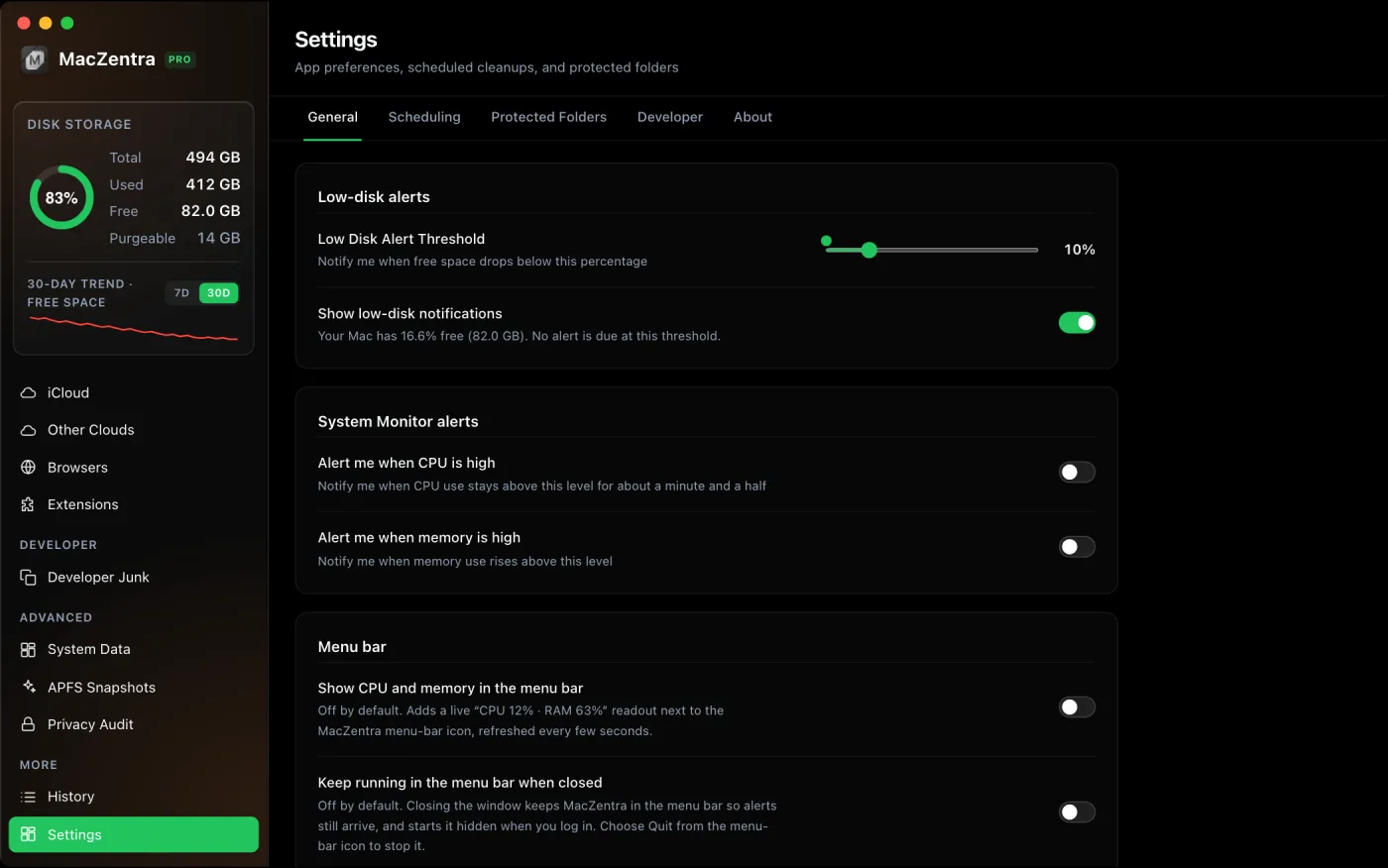
When free space drops below your configured threshold, the agent posts one native macOS notification. It is deliberately debounced: the alert won't re-fire on every poll while you're still low. Instead it only fires again after the disk recovers above the threshold and then dips below it a second time. So you get a useful nudge, not a stream of identical alerts.
How to set your threshold
- Open MacZentra.
- In the toolbar, find the low-disk threshold control.
- Set the percentage of free space at which you want to be warned (1 to 50 percent).
- Leave the app running (or just the menu-bar agent) and it watches from there.
What to do when the alert fires
Click Run Smart Care from the menu bar for an immediate pass at caches, the Trash and inactive memory, see Smart Care. If that isn't enough, open the app and look at the biggest items first; the fastest wins are usually large files, Docker.raw, and old node_modules rather than system caches.
Everything MacZentra can clean
Treemap and Sunburst disk maps, a duplicate finder, Developer Junk, a complete app uninstaller and more, in one native storage cleaner for Mac that’s 15.4 MB.
Explore all features →Related guides
Check storage · 6 min
Mac Storage Optimization That Actually Works
What macOS storage optimization really cleans, what it leaves behind, and how to reclaim the rest of your disk without a subscription.
Check storage · 7 min
Mac Storage Not Freeing Up After Deleting Files
Deleted files but Mac storage didn't change? Six causes, from the Trash and Photos to local snapshots and purgeable space, each with a fix to free it.
Check storage · 5 min
MacZentra App Store vs Web Version: Differences and Pricing
How the App Store edition (free, $19.99/year) differs from the $49.99 lifetime web version: features, limits, why the prices differ, and which to pick.
Free up space · 8 min
Free Up Space on Mac: 10 Fixes, Biggest First
Ten ways to free up Mac storage ranked by typical space recovered. Covers hidden Library folders and leftovers macOS Storage settings never show.