
Free up space
Best Mac Cleaner Without a Subscription (2027)
The MacZentra team · Updated Nov 23, 2026 · 6 min read
The best Mac cleaner without a subscription is MacZentra: a one-time $49.99 purchase, a free scan, and cleaning that sends files to the Trash. If you want something free, OnyX, AppCleaner and GrandPerspective cover most jobs. Prices and versions were checked on vendor pages in November 2026.
Subscription cleaners are the loudest part of this market. CleanMyMac’s page shows pricing from $3.33 a month, and plenty of other apps bill yearly. If you would rather pay once, or not at all, here are the options.
Mac cleaners without a subscription, ranked
| Rank | App | What you pay | What it does |
|---|---|---|---|
| 1 | MacZentra | $49.99 once, scan free | Disk map, junk, duplicates, developer clutter, uninstaller |
| 2 | DaisyDisk | One-time purchase | Disk map and manual deleting |
| 3 | OnyX | Free | Maintenance, caches, uninstalling |
| 4 | AppCleaner | Free | Uninstalls apps and leftovers |
| 5 | Mole | Free, open source | Terminal-based cleanup |
We ranked on three things: whether you pay once, whether the app cleans as well as scans, and whether deleting is recoverable.
1. MacZentra: one price, the whole job
You pay $49.99 once. There is no subscription, and the licence covers every update. The scan and every visualization (Treemap, Sunburst, Tree View) are free, so you can see what is using space before you pay for anything. Cleaning, deleting and uninstalling are the paid part.
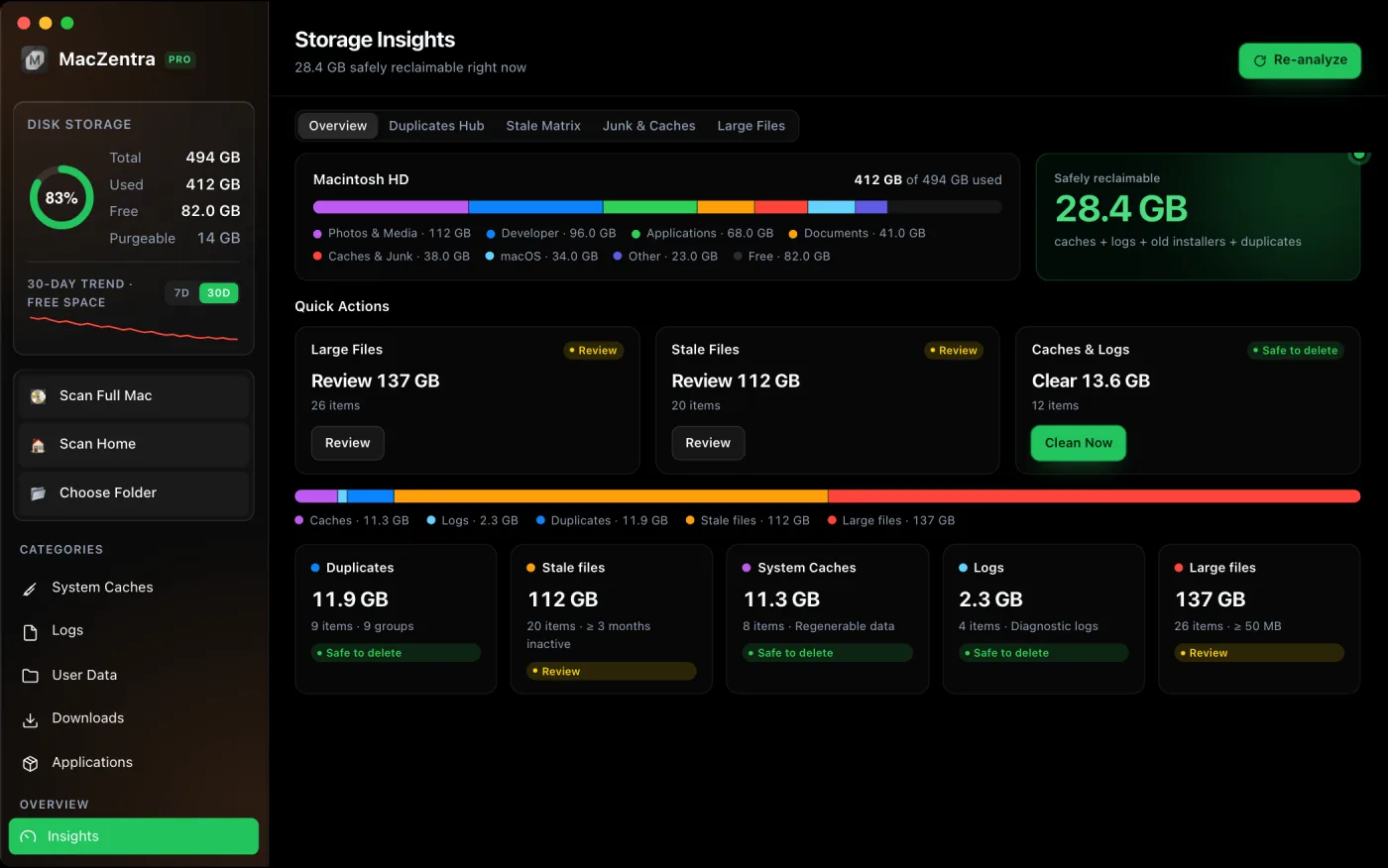
It covers duplicates, Junk, Developer Junk (Xcode, Docker, node_modules), System Data, APFS snapshots, browser data and an uninstaller. It is 15.4 MB, scans locally and uploads nothing, and everything it removes goes to the Trash.
Not great: it needs macOS 13 or later on Apple silicon, so Intel Macs are out. It isn’t a malware scanner, and it is a newer name than the others.
2. DaisyDisk: pay once for the map
DaisyDisk’s page describes a one-time purchase for up to five personal Macs, with version 4.34.2 from 10 July 2026. It is a very good way to see where space went. It doesn’t junk-scan or uninstall apps, and its comparison page says deleted files are removed permanently. Read the DaisyDisk comparison for the detail.
3. OnyX: free maintenance, if you read before you click
OnyX is a free Titanium Software utility for maintenance tasks, cache cleaning and uninstalling. Each release targets one macOS version, so match the build to your system. It is dense for newcomers, and clearing caches makes apps slower until they rebuild. See OnyX alternatives.
4. AppCleaner: free and does one thing
Drag an app onto AppCleaner and it lists the related files so you can remove them together. It is free and small, with no disk map and no junk scan. Pair it with an analyzer. More on that in uninstalling apps on a Mac completely.
5. Mole: free, for people who like Terminal
Mole is an open-source cleaner you run from the command line. It costs nothing, and it asks you to be comfortable with Terminal output. Our Mole comparison covers what it does and how it differs.
What you give up by avoiding the subscription
Not much, for storage work. Subscription suites bundle extras such as malware scanning, a menu bar monitor and update checks. If you want those, a suite makes sense, and our CleanMyMac alternative page lines the two up. If your problem is a full disk, a one-time cleaner does the same job for less over time.
| Years of use | Subscription at $3.33 a month | MacZentra at $49.99 |
|---|---|---|
| 1 | $39.96 | $49.99 |
| 3 | $119.88 | $49.99 |
| 5 | $199.80 | $49.99 |
The monthly figure comes from CleanMyMac’s page and may differ by country or plan, so check before you compare.
Pick in one minute
- Disk is full and you want to fix it in one app: MacZentra.
- You only want to look at a map: DaisyDisk, or GrandPerspective if you prefer free.
- You only remove apps: AppCleaner.
- You like tuning macOS yourself: OnyX.
- You live in Terminal: Mole.
Before any cleaner, try the built-in route in our 30-minute plan to free up space, and see the best Mac cleaners to download for the wider list.
Questions people ask
Is there a Mac cleaner without a subscription?
Yes. MacZentra and DaisyDisk are one-time purchases, and OnyX, AppCleaner, GrandPerspective and Mole are free.
What is the best free Mac cleaner?
There isn’t a single one. AppCleaner removes apps, OnyX handles maintenance, and MacZentra’s scan is free for seeing where space went.
Do I need a Mac cleaner at all?
Often not. Start with System Settings, then General, then Storage. A cleaner helps when you can’t see why the disk is full or you uninstall a lot. See the startup disk full guide.
Is a one-time cleaner as good as a subscription one?
For storage, yes. You lose bundled extras like malware scanning, not cleaning ability.
Everything MacZentra can clean
Treemap and Sunburst disk maps, a duplicate finder, Developer Junk, a complete app uninstaller and more, in one native storage cleaner for Mac that’s 15.4 MB.
Explore all features →Related guides

Free up space · 6 min
How to Find and Delete Screenshots on iPhone
How to find screenshots on iPhone in Photos, select hundreds at once, delete them, and empty Recently Deleted so the space comes back.
Free up space · 6 min
How to Free Up Space on iPhone: Checklist
How to free up space on iPhone with a monthly routine: Photos, Messages, offloading apps, Safari and downloads, plus a checklist table you can repeat.
Free up space · 6 min
iCloud Storage Plans: Which Size Do You Need?
iCloud storage plans explained: check what Photos, backups and Drive use, add a margin, trim first, then pick the smallest plan that fits. No tier guesses.
Check storage · 9 min
Best Mac Storage Cleaners 2026: Compared & Ranked
Mac storage cleaners and disk space analyzers compared by price, size, scan speed and licence. One-time, subscription and free options side by side.