
System Data
iCloud Optimize Mac Storage Without Losing Files
The MacZentra team · Updated Nov 17, 2026 · 6 min read
iCloud Drive can free a lot of local space without deleting anything. The trick is eviction: macOS keeps the file safe in the cloud but removes the downloaded copy from your disk, leaving a lightweight placeholder. Open the file later and it re-downloads automatically. Your data is never lost, it just stops taking up local room.
Downloaded vs. placeholder files
Everything in ~/Library/Mobile Documents/com~apple~CloudDocs is in one of two states:
| State | On disk? | Reclaimable? |
|---|---|---|
| Materialized (downloaded) | Full contents are stored locally | Yes, this is what eviction frees. |
| Placeholder (dataless) | Only a stub, a hidden .name.icloud sibling | Already freed, nothing to do. |
Only materialized files take local space, so those are the ones worth evicting. Placeholders are already "in the cloud only".
Eviction is reversible; deletion isn't
Find which iCloud files are taking local space
Before evicting anything, see how much iCloud Drive actually holds on this Mac. Placeholders take almost no room, so du reports only what is downloaded:
du -sh ~/Library/Mobile\ Documents/com~apple~CloudDocs# Biggest top-level folders firstdu -sh ~/Library/Mobile\ Documents/com~apple~CloudDocs/* 2>/dev/null | sort -h | tail -15
In Finder, open iCloud Drive in the sidebar. Items with a small cloud icon are already placeholders; items without one are downloaded and take local space. If Desktop & Documents Folders is turned on in iCloud Drive settings, your Desktop and Documents live here too, so they can be evicted the same way.
Two ways to free local iCloud space
1. Optimize Mac Storage (automatic). In System Settings → [your name] → iCloud → iCloud Drive, turn on "Optimize Mac Storage". macOS then evicts older, less-used files on its own when the disk gets low. It's hands-off but you don't choose what goes.
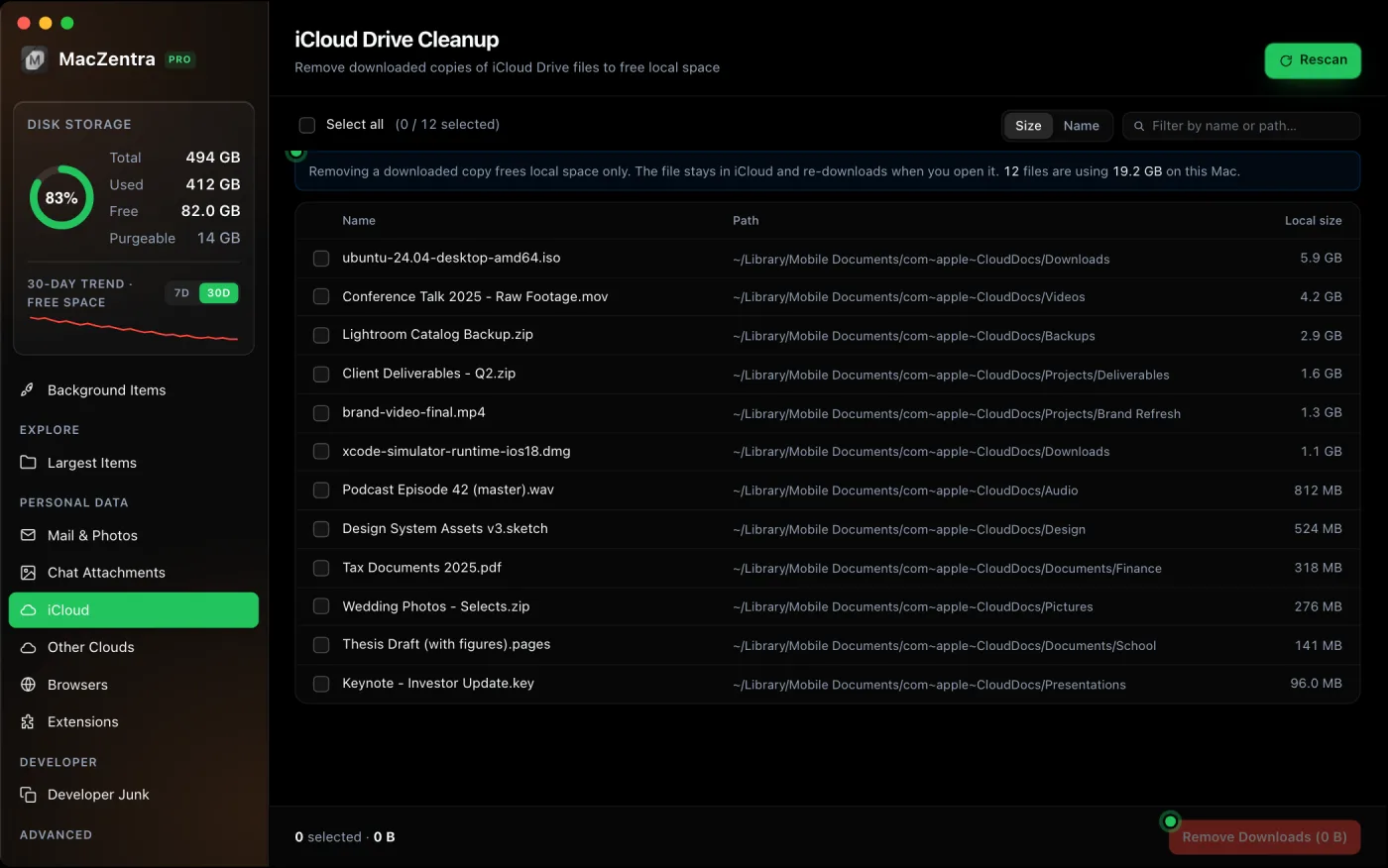
2. Evict a specific file (manual). In Finder, right-click a downloaded iCloud file and choose Remove Download. The file keeps its cloud badge and re-downloads on next open. From Terminal, the same thing:
brctl evict ~/Library/Mobile\ Documents/com~apple~CloudDocs/BigFolder
brctl evict is Apple's own tool for this. It's fully reversible, nothing leaves iCloud.
Why "available" space can be confusing afterward
Evicted space often shows up as part of macOS's purgeable figure before it becomes truly free, which is why Finder and Terminal can disagree about how much room you have. That's the same purgeable mechanism behind local snapshots, explained in APFS local snapshots. iCloud evicted data and snapshots together are a big part of what System Data holds.
iCloud Photos is a separate switch
iCloud Drive settings don't cover your photo library. Photos has its own option: in the Photos app, open Settings → iCloud and choose Optimize Mac Storage. Full-resolution originals stay in iCloud and the Mac keeps smaller versions, downloading an original when you open it. If your library is large, this one setting often frees more than everything in iCloud Drive. Duplicates are worth clearing first, see finding duplicate photos on a Mac.
iCloud is one of several ways to add room. How to get more storage on a Mac compares it with external drives and network storage. If the iCloud account itself is full, see what to do when iCloud storage is full.
Questions people ask
Does Remove Download delete the file from my iPhone or iCloud?
No. It only clears this Mac's local copy. The file stays in iCloud and on every other device, and comes back here the next time you open it.
Why did an evicted file download again?
Opening it, previewing it in Finder or an app reading it all trigger a download. That's expected. Evict it again once you're done, or leave it to Optimize Mac Storage.
What happens if I turn Optimize Mac Storage off?
macOS starts downloading the files it had offloaded, so make sure you have the free space first. On a small drive, leave it on and evict by hand when you need room.
Can I keep some files always downloaded?
On recent macOS versions, right-click a file or folder in iCloud Drive and choose Keep Downloaded. Optimize Mac Storage then leaves it alone, which is useful for files you need offline.
Everything MacZentra can clean
Treemap and Sunburst disk maps, a duplicate finder, Developer Junk, a complete app uninstaller and more, in one native storage cleaner for Mac that’s 15.4 MB.
Explore all features →Related guides
System Data · 6 min
What Is Other in Mac Storage? (Now System Data)
What is Other in Mac storage? Older Macs called it Other, newer ones say System Data. See what it held, what Other Volumes means, and how to shrink it.
System Data · 8 min
How to Clear System Data on Mac: What Is Safe to Delete
How to clear System Data on Mac safely: delete local snapshots, caches, old iPhone backups and developer files, with exact steps and a safe-to-delete table.
System Data · 6 min
How Much Storage Does macOS Take Up?
How much storage macOS takes up on your Mac, how to measure each volume, why System Data looks so big, and how to reclaim space safely.
Check storage · 9 min
Best Mac Storage Cleaners 2026: Compared & Ranked
Mac storage cleaners and disk space analyzers compared by price, size, scan speed and licence. One-time, subscription and free options side by side.